
티스토리 뷰
ROS
Ubuntu16.04 ROS Kinetic - rviz_xycar 패키지 : RVIZ기반 자동차 8자주행 예제. rviz_8_drive.py
donie 2021. 1. 25. 00:141. rviz_xycar 패키지
아래 예제에서 작성했던 패키지 사용.
2021/01/24 - [ROS] - Ubuntu16.04 ROS Kinetic - rviz_xycar 패키지 : RVIZ기반 자동차 바퀴 굴러가는 예제. move_joint.py
Ubuntu16.04 ROS Kinetic - rviz_xycar 패키지 : RVIZ기반 자동차 바퀴 굴러가는 예제. move_joint.py
1. 과제 RVIZ에서 자동차를 3D 형상으로 모델링하고, 핸들 조작, 바퀴를 굴릴 수 있도록 제작하는 예제. 2. rviz_xycar 패키지 catkin_create_pkg rviz_xycar rospy tf geometry_msgs urdf rviz xacro 3. xycar_m..
donie.tistory.com
2. 런치 파일
rviz_drive.launch
<launch>
    <param name="robot_description" textfile="$(find rviz_xycar)/urdf/xycar_3d.urdf"/>
    <param name="use_gui" value="true"/>

    <!-- rviz display -->
    <node name="rviz_visualizer" pkg="rviz" type="rviz" required="true"
                args="-d $(find rviz_xycar)/rviz/rviz_drive.rviz"/>

    <node name="robot_state_publisher" pkg="robot_state_publisher"
                type="state_publisher"/>

    <node name="driver" pkg="rviz_xycar" type="rviz_8_drive.py" />
    <node name="converter" pkg="rviz_xycar" type="converter.py" />

</launch>
3. 소스 파일
converter.py 작성 및 실행권한 부여
#!/usr/bin/env python

import rospy, rospkg
import math
from xycar_motor.msg import xycar_motor
from sensor_msgs.msg import JointState
from std_msgs.msg import Header

global pub
global msg_joint_states
global l_wheel, r_wheel

def callback(data):
    global msg_joint_states,l_wheel, r_wheel, pub
    Angle = data.angle
    msg_joint_states.header.stamp = rospy.Time.now()

    steering = math.radians(Angle * -0.4)

    if l_wheel > 3.14:
        l_wheel = -3.14
        r_wheel = -3.14
    else:
        l_wheel += 0.01
        r_wheel += 0.01

    msg_joint_states.position = [steering, steering, r_wheel, l_wheel,
                                    r_wheel, l_wheel]
    pub.publish(msg_joint_states)

def start():
    global msg_joint_states,l_wheel, r_wheel, pub
    rospy.init_node('converter')
    pub = rospy.Publisher('joint_states', JointState, queue_size=10)

    msg_joint_states = JointState()
    msg_joint_states.header = Header()
    msg_joint_states.name = ['front_right_hinge_joint',
				'front_left_hinge_joint',
				'front_right_wheel_joint',
				'front_left_wheel_joint',
				'rear_right_wheel_joint',
				'rear_left_wheel_joint']
    msg_joint_states.velocity = []
    msg_joint_states.effort = []
    l_wheel = -3.14
    r_wheel = -3.14
    rospy.Subscriber("xycar_motor", xycar_motor, callback)
    rospy.spin()

if __name__ == '__main__':
    start()
4. 실행
빌드
cm
실행
roslaunch rviz_xycar rviz_drive.launch
RVIZ에서 아래와 같은 결과가 나왔다.
고찰
실행 결과를 보고 이게 맞나 싶었는데, 영상에서 바퀴를 자세히 보면
바퀴가 왼쪽을 향해있다가 직진, 오른쪽을 향하다가 직진한다.
이것을 반복하면 8자주행이 된다.
8자중 동그란 부분은 왼쪽/오른쪽을 향해있는 바퀴, cross되는 부분에서는 직진 주행을 하는 것이다.
rqt_graph를 실행하면 아래와 같다.
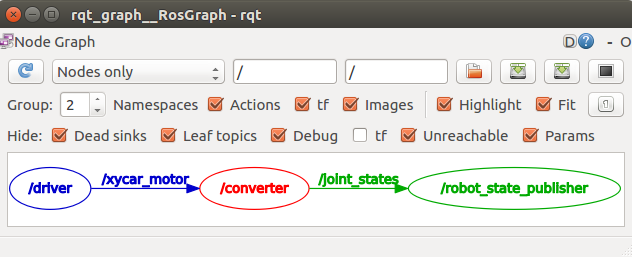
마찬가지로 실행이 끝난 후 rviz설정을 rviz_drive.rviz로 save한다.
'ROS' 카테고리의 다른 글
| Ubuntu16.04 ROS Kinetic - rviz_xycar 패키지 : RVIZ기반 자동차 바퀴 굴러가는 예제. move_joint.py (0) | 2021.01.24 |
|---|---|
| Ubuntu16.04 ROS Kinetic - ex_urdf 패키지. RVIZ 회전막대 모델 (0) | 2021.01.20 |
| Ubuntu16.04 ROS Kinetic - 저장된 ROS bag 파일에서 특정 토픽만 꺼내 동영상파일로 저장하기 (0) | 2021.01.19 |
| Ubuntu16.04 ROS Kinetic - my_cam 패키지 (0) | 2021.01.19 |
| Ubuntu16.04 ROS Kinetic - 초음파센서(HC-SR04) 4개 연결 실습 (0) | 2021.01.18 |
댓글
공지사항
최근에 올라온 글
최근에 달린 댓글
- Total
- Today
- Yesterday
링크
TAG
- 원격 통신
- python3
- Ubuntu20.04
- 리눅스
- 8자주행
- 윈도우
- subscriber
- sensehat
- 초음파센서
- VirtualBox
- HC-SR04
- Python
- ROS
- 우분투
- 프로그래머스
- roslaunch
- umount
- C++
- 백준알고리즘
- vue/cli
- Mount
- VMware
- 코드리뷰
- 포트인식문제
- Ubuntu16.04
- filesystem
- 윈도우 복구
- set backspace
- Publisher
- 아두이노 IDE
| 일 | 월 | 화 | 수 | 목 | 금 | 토 |
|---|---|---|---|---|---|---|
| 1 | 2 | 3 | 4 | 5 | 6 | 7 |
| 8 | 9 | 10 | 11 | 12 | 13 | 14 |
| 15 | 16 | 17 | 18 | 19 | 20 | 21 |
| 22 | 23 | 24 | 25 | 26 | 27 | 28 |
글 보관함